
Tool Calling
执行流程
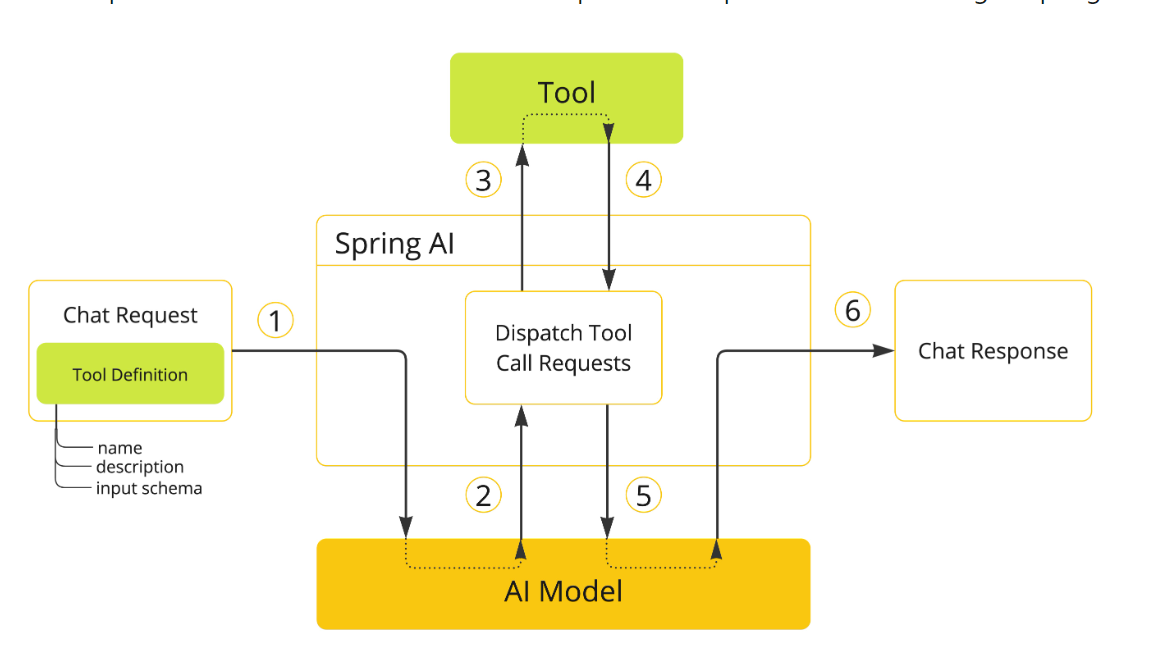
Methods模式:使用@Tools以及@ToolParam绑定工具
public class WeatherTools {    @Tool(description = "Get current weather by city name")    public String getWeather(@ToolParam(description = "The city name") String cityName) {        return "Current weather in " + cityName + ": sunny,30℃";    }}
// 调用方式 ChatClient.create(chatModel).prompt("获取北京的天气信息").tools(new WeatherTools()).call();
Functions模式:使用@Bean注解
@Configurationpublic class ToolConfig {    @Bean    @Description("Get current weather for a location")    public Function<WeatherRequest, WeatherResponse> weatherFunction() {        return request -> new WeatherResponse("Weather in " + request.getCity() + ": Sunny, 25°C");    }}
// 使用方式ChatClient.create(chatModel)    .prompt("What's the weather in Beijing?")    .functions("weatherFunction")    .call();
定义工具
注解式
使用@Tools
public class WeatherTools { @Tool(description = "Get current weather by city name") public String getWeather(@ToolParam(description = "The city name") String cityName) { return "Current weather in " + cityName + ": sunny,30℃"; }}编程式
首先需要定义好工具类
class WeatherTools { @Tool(description = "获取指定城市的当前天气情况") String getWeather(@ToolParam(description = "城市名称") String city) { return "北京今天晴朗,气温30°C"; }}将工具类转换为ToolCallBack工具定义类
Method method = ReflectionUtils.findMethod(WeatherTools.class, "getWeather", String.class);ToolCallback toolCallback = MethodToolCallback.builder() .toolDefinition(ToolDefinition.builder(method) .description("获取指定城市的当前天气情况") .build()) .toolMethod(method) .toolObject(new WeatherTools()) .build();使用工具
- 按需使用
String response = ChatClient.create(chatModel) .prompt("北京今天天气怎么样?") .tools(new WeatherTools()) // 在这次对话中提供天气工具 .call() .content();- 全局使用
ChatClient chatClient = ChatClient.builder(chatModel) .defaultTools(new WeatherTools(), new TimeTools()) // 注册默认工具 .build();- 底层调用,绑定ChatModel
// 先得到工具对象ToolCallback[] weatherTools = ToolCallbacks.from(new WeatherTools());// 绑定工具到对话ChatOptions chatOptions = ToolCallingChatOptions.builder() .toolCallbacks(weatherTools) .build();// 构造 Prompt 时指定对话选项Prompt prompt = new Prompt("北京今天天气怎么样?", chatOptions);chatModel.call(prompt);- 动态解析
ToolCallbackResolver使用适合工具需要根据上下文动态确定的场景
工具生态
Spring AI Alibaba但是里面只提供了一个,可以再官方代码仓库查看其它工具官方仓库地址
工具开发
文件操作
/** * 文件读写工具类 */public class FileOperationTool {    private final String FILE_DIR = FileConstant.tempDir + "/file";
    @Tool(description = "Read content from a file")    public String readFile(@ToolParam(description = "Name of the file to read") String fileName) {        String filePath = FILE_DIR + "/" + fileName;        try {            return FileUtil.readUtf8String(filePath);        } catch (Exception e) {            return "Error reading file: " + e.getMessage();        }    }
    @Tool(description = "Write content to a file")    public String writeFile(@ToolParam(description = "Name of the file to write") String fileName, @ToolParam(description = "the content to write to the file") String content) {        String filePath = FILE_DIR + "/" + fileName;        try {            FileUtil.mkdir(FILE_DIR);            FileUtil.writeUtf8String(content, filePath);            return "File written successfully: " + filePath;        } catch (Exception e) {            return "Error writing file: " + e.getMessage();        }    }}
测试
@SpringBootTest@ActiveProfiles("local")public class ToolsTest {
    @Test    public void writeFile() {        FileOperationTool tool = new FileOperationTool();        String fileName = "智能体AI.txt";        String content = " 我是测试文件内容";        String res = tool.writeFile(fileName, content);        System.out.println(res);    }
    @Test
    public void readFile(){        FileOperationTool tool = new FileOperationTool();        String fileName = "智能体AI.txt";        String s = tool.readFile(fileName);        System.out.println(s);    }}
联网搜索
可以使用Search API等专业网页搜索API实现多个网站获取内容,也可以通过爬虫等方式爬取搜索引擎等相关信息。
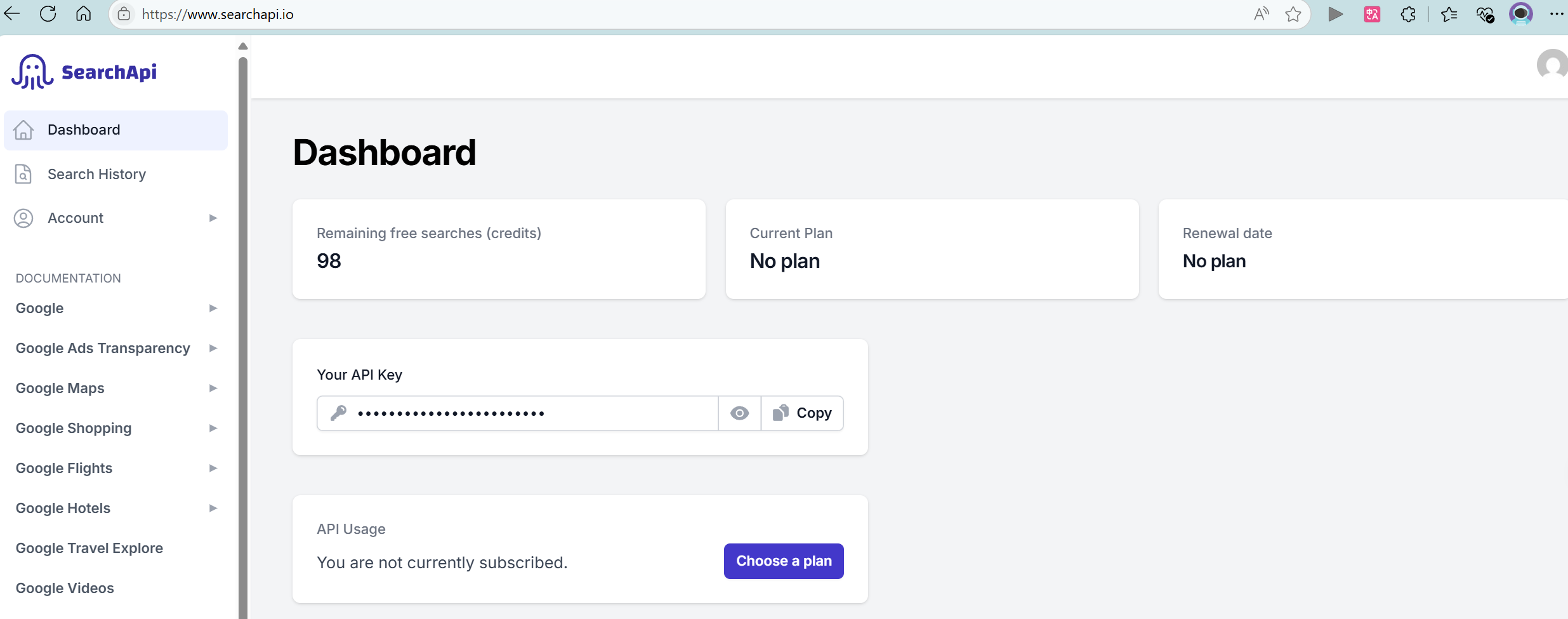
/** * 联网搜索 */public class WebOperationTool {    public static final String WEB_URL = "https://www.searchapi.io/api/v1/search";    private final String apiKey;
    public WebOperationTool(String apiKey) {        this.apiKey = apiKey;    }
    @Tool(description = "Search for information from Baidu Search Engine")    public String getWebContent(@ToolParam(description = "Search key word") String query) {        // 1. 构造请求参数        Map<String, Object> param = new HashMap<>();        param.put("engine", "baidu");        param.put("q", query);        param.put("api_key", apiKey);        // 2. 发送请求        try {            String response = HttpUtil.get(WEB_URL, param);            JSONObject jsonObject = JSONUtil.parseObj(response);            JSONArray organicResults = jsonObject.getJSONArray("organic_results");            // 前5条            List<Object> objects = organicResults.subList(0, 5);            String result = objects.stream().map(obj -> {                JSONObject jsonObject1 = (JSONObject) obj;                return jsonObject1.toString();            }).collect(Collectors.joining(","));            return result;        } catch (Exception e) {            return "Error search baidu: " + e.getMessage();        }    }}
测试调用
    @Value("${search.api-key}")    private String apikey;
    @Test    public void searchOnLine() {        WebOperationTool tool = new WebOperationTool(apikey);        String content = tool.getWebContent("大熊猫");        System.out.println(content);    }
后续只需要过滤出符合我们需求的数据即可。
网页抓取
可以使用jsoup抓取网页。
- 引入依赖
<dependency> <groupId>org.jsoup</groupId> <artifactId>jsoup</artifactId> <version>1.19.1</version></dependency>- 简单获取网页html内容
/** * 网页抓取工具类 */public class WebScrapingTool {
@Tool(description = "Scrape the content of a web page") public String scrapeWebPage(@ToolParam(description = "url of the web to scrape") String url) { try { Document document = Jsoup.connect(url).get(); return document.html(); } catch (Exception e) { return "Error scrape web: " + e.getMessage(); } }}目前只会返回对应的网页html信息,可以获取更加详细信息,详情可以参考在线抓取图片
- 测试
@Test public void searchOnLine() { WebOperationTool tool = new WebOperationTool(apikey); String content = tool.getWebContent("大熊猫"); System.out.println(content); }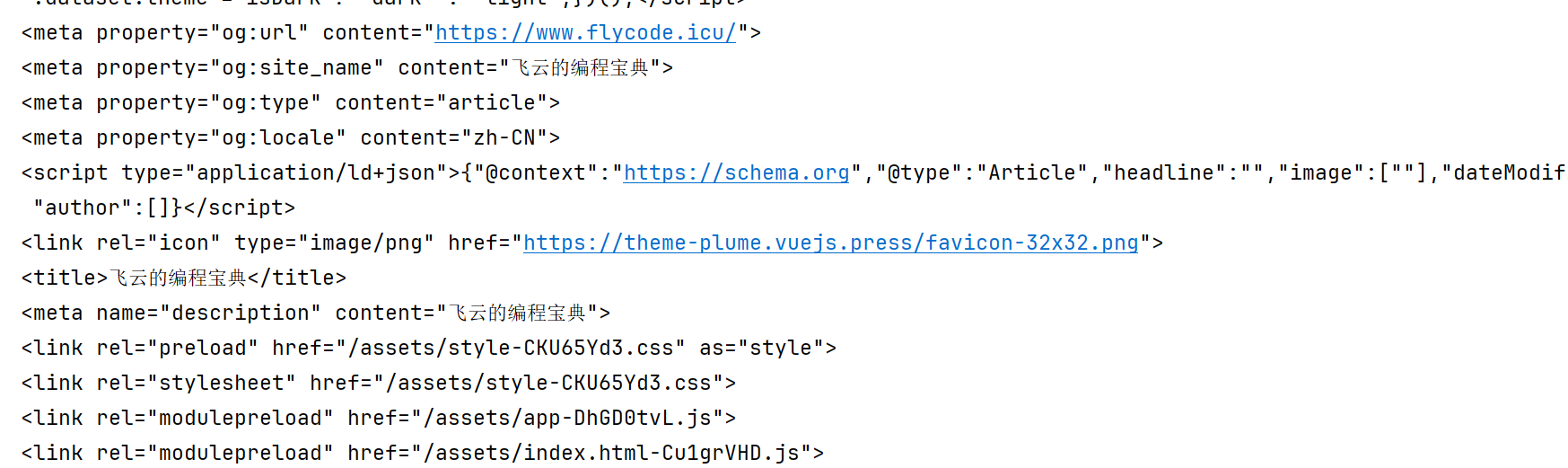
终端操作
可以使用ProcessBuilder,在windows和linux不同环境,需要使用不同的Process方式。
public class TerminalOperationTool {
    @Tool(description = "Execute a terminal command and return the output")    public String executeTerminalCommand(@ToolParam(description = "Execute command") String command) {        StringBuilder stringBuilder = new StringBuilder();        try {            ProcessBuilder builder = new ProcessBuilder("cmd.exe", "/c", command);            // Process process = Runtime.getRuntime().exec(command);            Process process = builder.start();            try (BufferedReader reader = new BufferedReader(new InputStreamReader(process.getInputStream(),"GBK"))) {                String line;                while ((line = reader.readLine()) != null) {                    stringBuilder.append(line).append("\n");                }                int exitCode = process.waitFor();                if (exitCode != 0) {                    throw new RuntimeException("Terminal command failed with exit code " + exitCode);                }                process.destroy();            }        } catch (Exception e) {            return "Error executing terminal command: " + e.getMessage();        }
return stringBuilder.toString(); }} @Test public void executeTerminalCommand() { String command = "dir"; TerminalOperationTool tool = new TerminalOperationTool(); String res = tool.executeTerminalCommand(command); System.out.println(res); }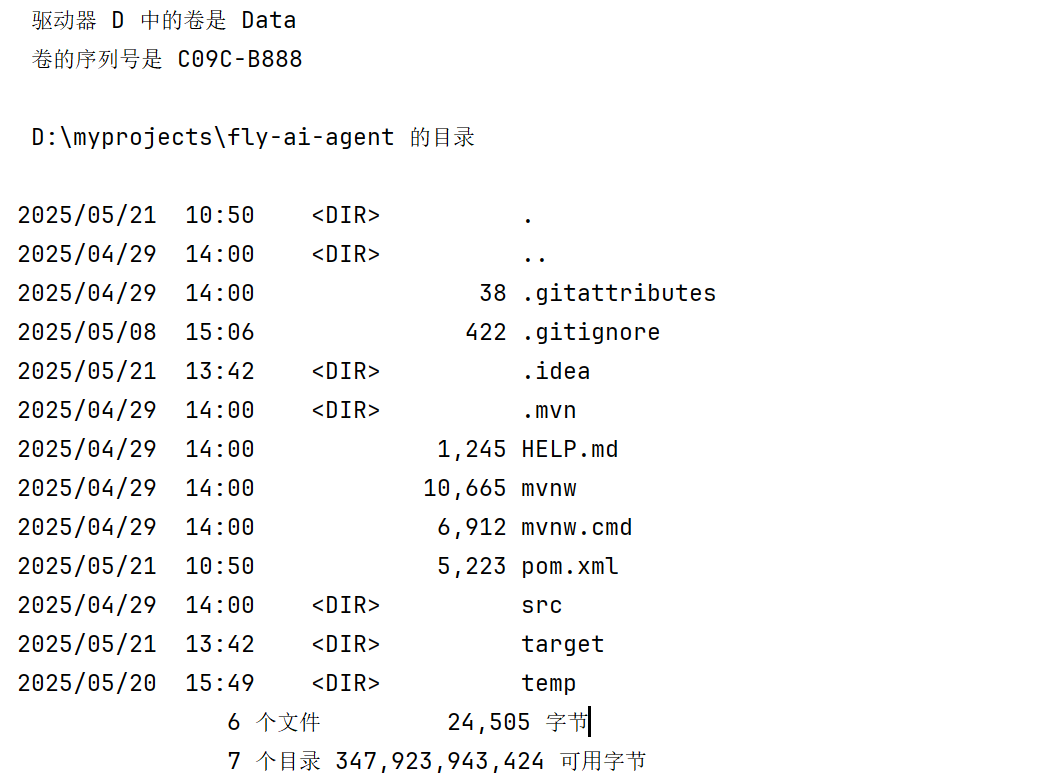
资源下载
通过指定URL下载文件到本地
public class ResourceDownloadTool {
@Tool(description = "Download file from url") public String downloadResource( @ToolParam(description = "URL of the resource to download") String url, @ToolParam(description = "Name of the file to save the download resource") String fileName) { // 设置下载地址 String fileDir = FileConstant.tempDir + "/download"; String filePath = fileDir + "/" + fileName; // 下载文件 try { File dir = FileUtil.mkdir(fileDir); HttpUtil.downloadFile(url, filePath); return "download file: " + fileName + " success"; } catch (Exception e) { return "Error download file " + e.getMessage(); } }}@Testpublic void download() { String url = "https://www.codefather.cn/logo.png"; String fileName = "logo.png"; ResourceDownloadTool tool = new ResourceDownloadTool(); String res = tool.downloadResource(url, fileName); System.out.println(res);}PDF生成
可以使用itext-java这个工具生成PDF文件
引入依赖
<!-- https://mvnrepository.com/artifact/com.itextpdf/itext-core --><dependency> <groupId>com.itextpdf</groupId> <artifactId>itext-core</artifactId> <version>9.1.0</version> <type>pom</type></dependency><!-- https://mvnrepository.com/artifact/com.itextpdf/font-asian --><dependency> <groupId>com.itextpdf</groupId> <artifactId>font-asian</artifactId> <version>9.1.0</version> <scope>test</scope></dependency>生成PDF工具类
public class PDFGenerateTool {    @Tool(description = "Generate a PDF with given content")    public String generatePDF(            @ToolParam(description = "Name of the file to save the generated PDF")            String fileName,            @ToolParam(description = "Content to be written in the PDF")            String content) {        // 设置下载地址        String fileDir = FileConstant.tempDir + "/pdf";        String filePath = fileDir + "/" + fileName ;
        try {            FileUtil.mkdir(fileDir);            try (PdfWriter pdfWriter = new PdfWriter(filePath);                 PdfDocument pdfDocument = new PdfDocument(pdfWriter);                 Document document = new Document(pdfDocument)) {                // 使用内置中文                PdfFont pdfFont = PdfFontFactory.createFont("STSong-Light", "UniGB-UCS2-H");                document.setFont(pdfFont);
                // 创建段落                Paragraph paragraph = new Paragraph(content);                document.add(paragraph);            }            return "PDF Generated Successfully to " + filePath;        } catch (Exception e) {            return "Error PDF Generated file: " + e.getMessage();        }    }}
集中注册
@Configurationpublic class ToolRegistration {
    @Value("${search.api-key}")    private String apiKey;
@Bean public ToolCallback[] allTools() { FileOperationTool fileOperationTool = new FileOperationTool(); PDFGenerateTool pdfGenerateTool = new PDFGenerateTool(); ResourceDownloadTool resourceDownloadTool = new ResourceDownloadTool(); TerminalOperationTool terminalOperationTool = new TerminalOperationTool(); WebOperationTool webOperationTool = new WebOperationTool(apiKey); WebScrapingTool webScrapingTool = new WebScrapingTool(); return ToolCallbacks.from( fileOperationTool, pdfGenerateTool, resourceDownloadTool, terminalOperationTool, webOperationTool, webScrapingTool ); }}- 工厂模式:allTools()方法作为一个工厂方法,负责创建和配置多个工具实例,然后将它们包装成统一的数组返回。这符合工厂模式的核心思想-集中创建对象并隐藏创建细节。
- 依赖注入模式:通过 @value 注解注入配置值,以及将创建好的工具通过Spring容器注入到需要它们的组件中。
- 注册模式:该类作为一个中央注册点,集中管理和注册所有可用的工具,使它们能够被系统其他部分统一访问。
- 适配器模式的应用:ToolCallbacks.from 方法可以看作是一种适配器,它将各种不同的工具类转换为统一的ToolCallback数组,使系统能够以一致的方式处理它们。
测试集中注册
    @Resource    private ToolCallback[] allTools;
    private final ChatClient chatClient;    @Resource    private VectorStore loveAppVectorStore;
    public LoveApp(ChatModel dashscopeChatModel, VectorStore loveAppVectorStore) {        this.loveAppVectorStore = loveAppVectorStore;        // 初始化基于内存的对话记忆        ChatMemory chatMemory = new LocalMemory(baseDir);        //SystemPromptTemplate systemPromptTemplate = new SystemPromptTemplate(systemResource.toString());        chatClient = ChatClient.builder(dashscopeChatModel)                .defaultSystem(SYSTEM_PROMPT)                .defaultAdvisors(                        new MessageChatMemoryAdvisor(chatMemory),                        new WordAdvisors()                )                .build();    }
public String doChatWithTools(String message, String chatId) { ChatResponse chatResponse = chatClient .prompt() .user(message) .system(SYSTEM_PROMPT) .advisors(spec -> spec.param(CHAT_MEMORY_CONVERSATION_ID_KEY, chatId) .param(CHAT_MEMORY_RETRIEVE_SIZE_KEY, 10)) .tools(allTools) .call() .chatResponse(); String content = chatResponse.getResult().getOutput().getText(); log.info(content); return content; } @Test void doChatWithTools() { String chatId = UUID.randomUUID().toString(); String message = "给我生成北京的旅游景点PDF,包含时间、计划和费用,生成10条信息"; loveApp.doChatWithTools(message, chatId); }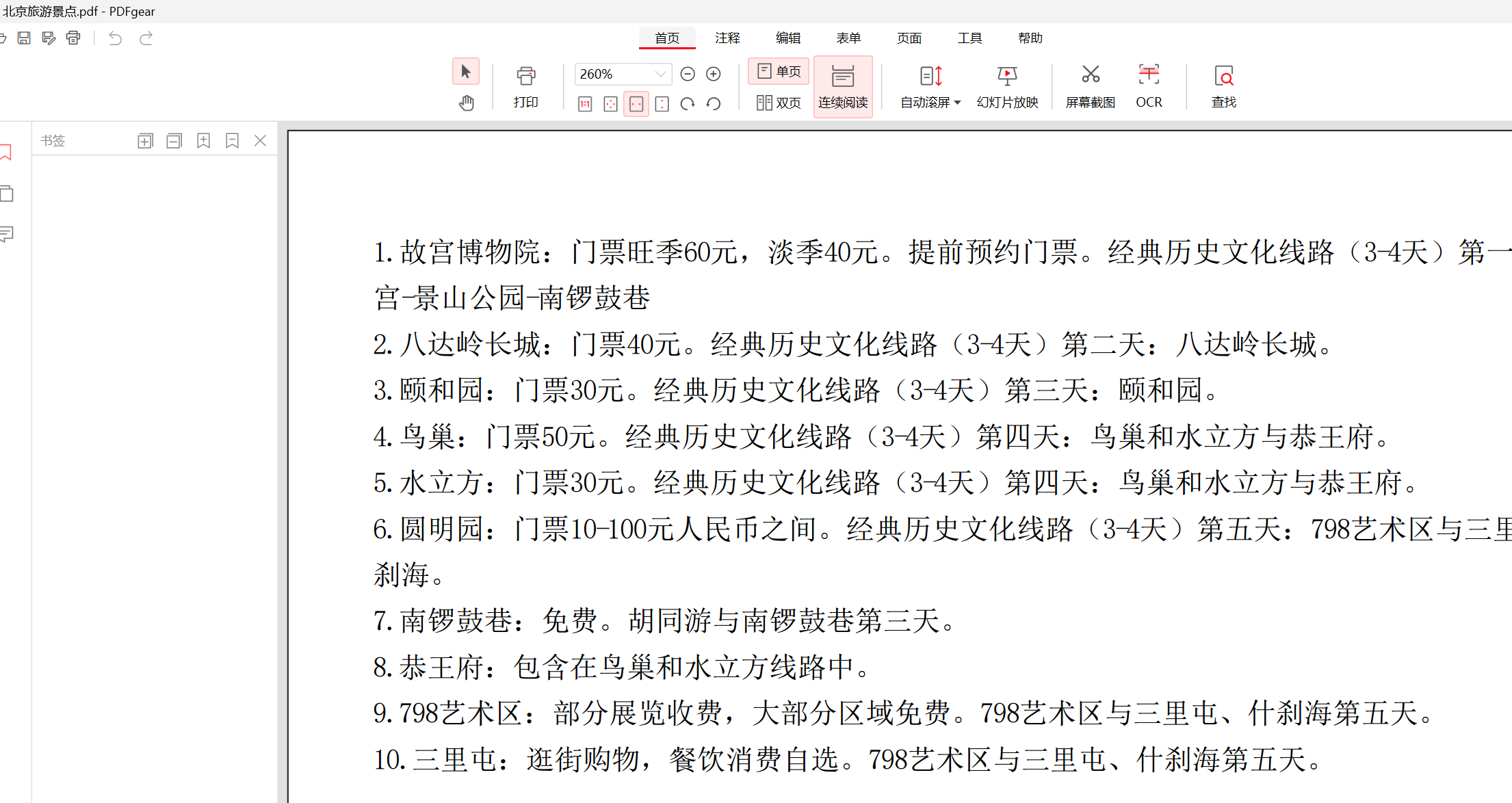
底层原理
ToolCallback
ToolCallback继承于FunctionCallback,实现如下接口
public interface ToolCallback { /** * Definition used by the AI model to determine when and how to call the tool. */ ToolDefinition getToolDefinition(); /** * Metadata providing additional information on how to handle the tool. */ ToolMetadata getToolMetadata(); /** * Execute tool with the given input and return the result to send back to the AI model. */ String call(String toolInput); /** * Execute tool with the given input and context, and return the result to send back to the AI model. */ String call(String toolInput, ToolContext tooContext);}ToolDefinition接口为 AI 模型提供了解工具可用性所需的信息,包括工具名称、描述和输入架构。getToolMetadata返回该工具的元数据- 两个call()是工具的执行入口,分别支持有上下文和无上下文的调用场景
ToolDefinition
public interface ToolDefinition {    String name();
    String description();
    String inputSchema();
    static DefaultToolDefinition.Builder builder() {        return DefaultToolDefinition.builder();    }
    static DefaultToolDefinition.Builder builder(Method method) {        Assert.notNull(method, "method cannot be null");        return DefaultToolDefinition.builder().name(ToolUtils.getToolName(method)).description(ToolUtils.getToolDescription(method)).inputSchema(JsonSchemaGenerator.generateForMethodInput(method, new JsonSchemaGenerator.SchemaOption[0]));    }
    static ToolDefinition from(Method method) {        return builder(method).build();    }}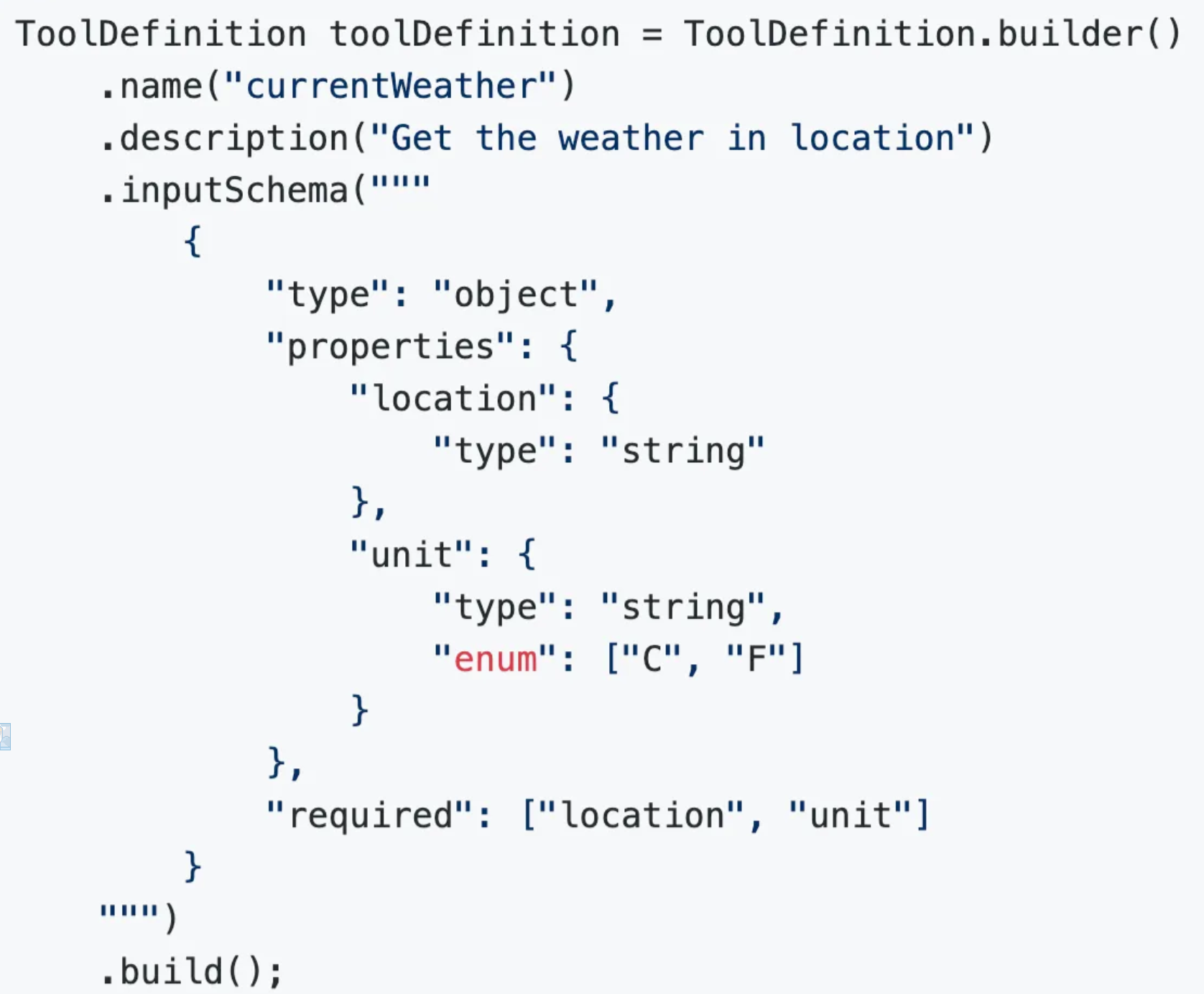
- JsonSchemaGenerator 会解析方法签名和注解,自动生成符合JSON Schema规范的参数定义,作为ToolDefinition的 一部分提供给AI大模型
- ToolCallResultConverter 负责将各种类型的方法返回值统一转换为字符串,便于传递给AI大模型处理
- MethodToolCallback 实现了对注解方法的封装,使其符合接口规范
我们只需要专注一业务逻辑,而不需要关心底层通信和参数转换的复杂细节,我们也可以通过自定义ToolCallResultConverter实现
Tool Context 工具上下文
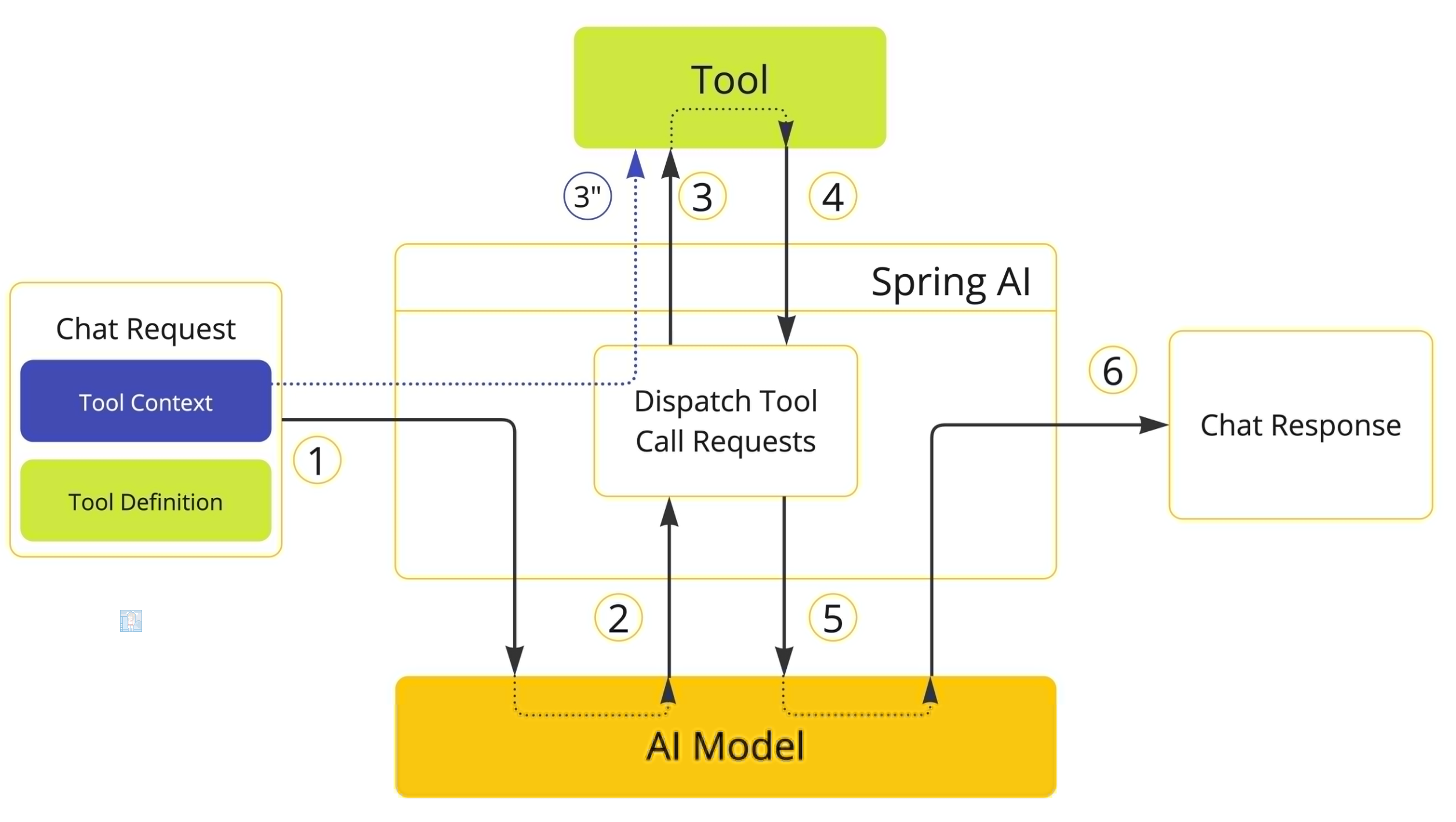
Spring AI 支持通过 ToolContext API 将额外的上下文信息传递给工具。此功能允许您提供额外的用户提供的数据,这些数据可与 AI 模型传递的工具参数一起在工具执行中使用。
class CustomerTools { @Tool(description = "Retrieve customer information") Customer getCustomerInfo(Long id, ToolContext toolContext) { return customerRepository.findById(id, toolContext.get("tenantId")); }}ToolContext 使用用户在调用 ChatClient 时提供的数据进行填充
ChatModel chatModel = ...
String response = ChatClient.create(chatModel)        .prompt("Tell me more about the customer with ID 42")        .tools(new CustomerTools())        .toolContext(Map.of("tenantId", "acme"))        .call()        .content();
System.out.println(response);
也可以直接调用ChatModel定义工具上下文
ChatModel chatModel = ...ToolCallback[] customerTools = ToolCallbacks.from(new CustomerTools());ChatOptions chatOptions = ToolCallingChatOptions.builder() .toolCallbacks(customerTools) .toolContext(Map.of("tenantId", "acme")) .build();Prompt prompt = new Prompt("Tell me more about the customer with ID 42", chatOptions);chatModel.call(prompt);本质上ToolContext是一个Map
public class ToolContext { private final Map<String, Object> context;}这些信息不会传递给AI模型,只有在程序内部使用,适用于:
- 用户认证信息:可以在上下文传递用户token,而不暴露给模型
- 请求追踪:上下文加入ID,便于日志追踪和调试
- 自定义配置:不同场景传递不同信息
Return Direct 直接返回
- 定义工具时,将 returnDirect 属性设为true
- 当模型请求调用这个工具时,应用程序执行工具并获取结果
- 结果直接返回给调用者,不再发送回模型进行进一步处理
这种模式很适合需要返回二进制数据(比如图片/文件)的工具、返回大量数据而不需要AI解释的工具,以及产生明确 结果的操作(如数据库操作)。
Tool Execution 工具执行
ToolCallingManager是管理AI工具调用全流程的核心组件,负责将AI模型的响应执行对应的工具并返回结果给大模型。
public interface ToolCallingManager {
  /**   * Resolve the tool definitions from the model's tool calling options.   * 模型工具调用选项中解析工具定义   */  List<ToolDefinition> resolveToolDefinitions(ToolCallingChatOptions chatOptions);
  /**   * Execute the tool calls requested by the model.   * 执行模型对应的工具调用   */  ToolExecutionResult executeToolCalls(Prompt prompt, ChatResponse chatResponse);
  /**   * Create a default {@link ToolCallingManager} builder.   */  static DefaultToolCallingManager.Builder builder() {    return DefaultToolCallingManager.builder();  }
}
public ToolExecutionResult executeToolCalls(Prompt prompt, ChatResponse chatResponse) { Assert.notNull(prompt, "prompt cannot be null"); Assert.notNull(chatResponse, "chatResponse cannot be null");
Optional<Generation> toolCallGeneration = chatResponse.getResults() .stream() .filter(g -> !CollectionUtils.isEmpty(g.getOutput().getToolCalls())) .findFirst();
if (toolCallGeneration.isEmpty()) { throw new IllegalStateException("No tool call requested by the chat model"); }
AssistantMessage assistantMessage = toolCallGeneration.get().getOutput();
ToolContext toolContext = buildToolContext(prompt, assistantMessage);
InternalToolExecutionResult internalToolExecutionResult = executeToolCall(prompt, assistantMessage, toolContext);
List<Message> conversationHistory = buildConversationHistoryAfterToolExecution(prompt.getInstructions(), assistantMessage, internalToolExecutionResult.toolResponseMessage());
return ToolExecutionResult.builder() .conversationHistory(conversationHistory) .returnDirect(internalToolExecutionResult.returnDirect()) .build(); }基本流程就是从历史上下文中拿出关键信息,判断是否有工具需要调用,有工具调用,执行完成获取结果,然后拼接到上下文。
框架控制的工具执行
- 框架自动检测模型是否请求调用工具
- 自动执行工具调用并获取结果
- 自动将结果发送回模型
- 管理整个对话流程直到得到最终答案
用户控制的工具执行
对于需要更精细控制复杂场景,可以通过设置ToolCallingChatOptions禁止内部工具执行,然后可以自定义执行工具流程。
// 配置不自动执行工具ChatOptions chatOptions = ToolCallingChatOptions.builder() .toolCallbacks(ToolCallbacks.from(new WeatherTools())) .internalToolExecutionEnabled(false) // 禁用内部工具执行 .build();// 创建工具调用管理器ToolCallingManager toolCallingManager = DefaultToolCallingManager.builder().build();
// 创建初始提示Prompt prompt = new Prompt("xxxx", chatOptions);// 发送请求给模型ChatResponse chatResponse = chatModel.call(prompt);// 手动处理工具调用循环while (chatResponse.hasToolCalls()) { // 执行工具调用 ToolExecutionResult toolExecutionResult = toolCallingManager.executeToolCalls(prompt, chatResponse); // 创建包含工具结果的新提示 prompt = new Prompt(toolExecutionResult.conversationHistory(), chatOptions); // 再次发送请求给模型 chatResponse = chatModel.call(prompt);}
// 获取最终回答System.out.println(chatResponse.getResult().getOutput().getText());异常处理
里面内置了一个异常处理ToolExecutionExceptionProcessor
@FunctionalInterfacepublic interface ToolExecutionExceptionProcessor { /** * 将工具抛出的异常转换为发送给 AI 模型的字符串,或者抛出一个新异常由调用者处理 */ String process(ToolExecutionException exception);}默认实现类提供两种处理策略
- alwaysThrow 参数为false:将异常信息作为错误消息返回给AI模型,允许模型根据错误信息调整策略
- alwaysThrow 参数为true:直接抛出异常,中断当前对话流程,由应用程序处理
也可以实现自定义异常处理
@BeanToolExecutionExceptionProcessor customExceptionProcessor() { return exception -> { if (exception.getCause() instanceof IOException) { // 网络错误返回友好消息给模型 return "Unable to access external resource. Please try a different approach."; } else if (exception.getCause() instanceof SecurityException) { // 安全异常直接抛出 throw exception; } // 其他异常返回详细信息 return "Error executing tool: " + exception.getMessage(); };}工具解析
除了使用ToolCallBack交给AI执行工具,也可以通过名称动态解析工具,通过ToolCallbackResolver接口实现的
public interface ToolCallbackResolver { /** * 根据给定的工具名称解析对应的ToolCallback */ @Nullable ToolCallback resolve(String toolName);}// 客户端只需提供工具名称String response = ChatClient.create(chatModel) .prompt("What's the weather in Beijing?") .toolNames("weatherTool", "timeTool") // 只提供名称 .call() .content();也可以自定义解析逻辑
@BeanToolCallbackResolver customToolCallbackResolver() { Map<String, ToolCallback> toolMap = new HashMap<>(); toolMap.put("weatherTool", new WeatherToolCallback()); toolMap.put("timeTool", new TimeToolCallback()); return toolName -> toolMap.get(toolName);}也可以扩展当前的解析器
@BeanToolCallbackResolver customToolCallbackResolver() { Map<String, ToolCallback> toolMap = new HashMap<>(); toolMap.put("weatherTool", new WeatherToolCallback()); toolMap.put("timeTool", new TimeToolCallback()); return toolName -> toolMap.get(toolName);}
评论